ドットイートゲームとは、コンピュータゲームのアクションゲームのジャンルのひとつです。敵の追跡から逃れつつ、迷路内に敷き詰められた目標(大抵はドットで表現される)の上を通過することで消していくゲームです。パックマンはドットイートゲームの典型であるといえます。
今回は時間の経過とともに形状が変化する迷路でドットイートゲームをつくります。
迷路の生成
迷路はどうやって生成すればいいのでしょうか?
まず迷路の交差点になりうる頂点を用意します。それらの頂点を繋いだり繋がなかったりを切り替えることで迷路のようなものを作ることができるのではないでしょうか?
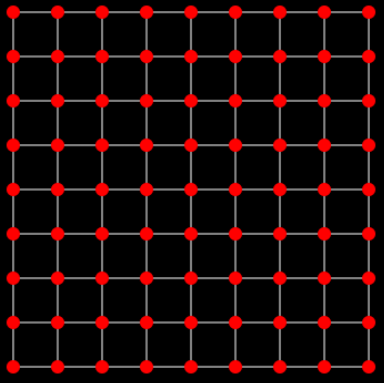
このような頂点を用意し、隣の頂点とつなぎます。その際に辺に重みを設定し、最小全域木を構築します。
最小全域木とは、重み付き無向連結グラフにおいて、全頂点を結びつつ閉路を含まず、辺の重みの総和が最小となる全域木のことです。
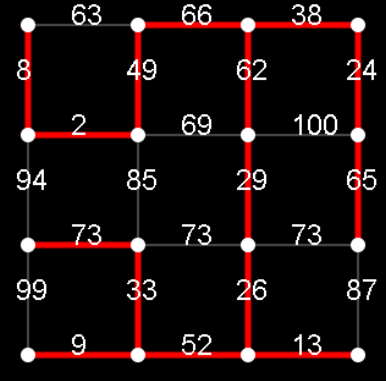
最小全域木はクラスカル法で構築します。辺の重みが小さいものから繋いでいくのですが、繋ぐことで閉路ができる場合は飛ばします。辺を繋ぐことで閉路ができるかどうかはUnionFind木を使って判定します。
UnionFind木とはグループ分けを木構造で管理するデータ構造です。ふたつの頂点がすでに同じグループに属するのであれば閉路ができることがわかります。
参考:
データ構造 Union-Find 木 蟻本読書会
グラフ理論 最小全域木問題 クラスカル法 蟻本読書会
最後に最小全域木の葉に該当する頂点を近くの頂点につなげることで閉路がある迷路を生成することができます。
HTML部分
HTML部分を示します。
|
1 2 3 4 5 6 7 8 9 10 11 12 13 14 15 16 17 18 19 20 21 22 23 24 25 26 27 28 29 30 31 32 33 34 35 36 37 38 39 40 41 42 |
<!DOCTYPE html> <html lang="ja"> <head> <meta charset="UTF-8"> <title>動的迷路でドットイートゲーム</title> <meta name = "viewport" content = "width=device-width, initial-scale = 1.0"> <link rel="stylesheet" href="./style.css"> </head> <body> <div id = "container"> <div id = "field"> <div id = "field-header"> <h1>動的迷路でドットイートゲーム</h1> <div id = "score"></div><div id = "life"></div> </div> <div id = "canvas-outer"></div> <div id = "start-buttons"> <p><label for="player-name">プレイヤー名:</label> <input id = "player-name" maxlength="32"></p> <p><button id = "start">START</button></p> <p><button id = "go-ranking" onclick="location.href = './ranking.html'">ランキング</button></p> </div> <div id = "control-buttons"> <button id = "left">←</button> <button id = "up">↑</button> <button id = "down">↓</button> <button id = "right">→</button> </div> <div id = "volume"></div> </div> </div> <script src="./index.js"></script> </body> </html> |
style.css
|
1 2 3 4 5 6 7 8 9 10 11 12 13 14 15 16 17 18 19 20 21 22 23 24 25 26 27 28 29 30 31 32 33 34 35 36 37 38 39 40 41 42 43 44 45 46 47 48 49 50 51 52 53 54 55 56 57 58 59 60 61 62 63 64 65 66 67 68 69 70 71 72 |
body { background-color: black; color: white; } #container { margin: 40px auto 40px auto; width: 360px; } #field-header { margin-left: 10px; margin-bottom: 45px; } #field { width: 360px; height: 600px; margin-left: auto; margin-right: auto; position: relative; border: 0px #1DA1F2 solid; } #score { float: left; font-size: large; margin-left: 10px; } #life { float: right; font-size: large; margin-right: 16px; } h1 { color:aqua; font-size: x-large; } #start-buttons { position: absolute; left: 0px; top: 130px; width: 100%; text-align: center; } #start, #go-ranking { font-weight: bold; text-align: center; font-size: 18px; width: 280px; border: none; font-size: 16px; background-color: #1DA1F2; padding: 10px 32px; border-radius: 100vh; color: white; cursor: pointer; } #control-buttons { width: 100%; text-align: center; left: 0px; top: 380px; display: block; } #up, #left, #right, #down { width: 64px; height: 60px; background-color: transparent; border: 2px #fff solid; margin-left: 5px; margin-right: 5px; font-size: 18px; color: #fff; font-weight: bold; } |
グローバル定数
グローバル定数を示します。
index.js
|
1 2 3 4 5 6 7 8 9 10 11 12 13 14 15 16 17 |
const ROW_COUNT = 9; // 縦横の頂点の数 const COL_COUNT = 9; const SIDE_LENGTH = 360 / COL_COUNT; // 隣の頂点との距離 const MARGIN = SIDE_LENGTH / 2; // canvasの左上にいれる余白部分 const ENEMIES_COUNT = 4; // 敵の数 const CANVAS_WIDTH = 360; // canvasのサイズ const CANVAS_HEIGHT = 360; // canvasを生成して追加する const $canvas_outer = document.getElementById('canvas-outer'); const $canvas = document.createElement('canvas'); $canvas.width = CANVAS_WIDTH; $canvas.height = CANVAS_HEIGHT; $canvas_outer.appendChild($canvas); const ctx = $canvas.getContext('2d'); // 描画用 |
Vertexクラスの定義
頂点を描画するために Vertexクラスを定義します。
|
1 2 3 4 5 6 7 8 9 10 11 12 13 14 15 16 17 18 |
class Vertex { constructor(row, col){ this.Row = row; // 何行何列目の頂点か? this.Col = col; this.X = col * SIDE_LENGTH + MARGIN; // 描画位置 this.Y = row * SIDE_LENGTH + MARGIN; // canvasの余白分だけ描画位置をズラす this.IsPlayerVisited = false; } Draw(){ if(!this.IsPlayerVisited){ // 未訪問の頂点のみ描画(これを餌とする) ctx.fillStyle = '#f00'; ctx.beginPath(); ctx.arc(this.X, this.Y, 6, 0, Math.PI * 2); ctx.fill(); } } } |
Edgeクラスの定義
通路(頂点と頂点を繋ぐ辺)を描画するために Edgeクラスを定義します。
|
1 2 3 4 5 6 7 8 9 10 11 12 13 14 15 16 17 18 19 20 21 22 23 24 25 |
class Edge { constructor(r1, c1, r2, c2){ this.X1 = c1 * SIDE_LENGTH + MARGIN; // 辺の両端の座標 this.Y1 = r1 * SIDE_LENGTH + MARGIN; this.X2 = c2 * SIDE_LENGTH + MARGIN; this.Y2 = r2 * SIDE_LENGTH + MARGIN; this.Index1 = r1 * COL_COUNT + c1; // 辺の両端の頂点に通し番号をつける this.Index2 = r2 * COL_COUNT + c2; this.IsUsed = false; // true ならこの辺は通行可能である this.W = 0; // 辺の重み } Draw(){ if(!this.IsUsed) // 通行不能の辺は描画しない return; ctx.strokeStyle = '#fff'; ctx.lineWidth = 2; ctx.beginPath(); ctx.moveTo(this.X1, this.Y1); ctx.lineTo(this.X2, this.Y2); ctx.stroke(); } } |
Playerクラスの定義
プレイヤーの状態の管理と描画のためにPlayerクラスを定義します。
|
1 2 3 4 5 6 7 8 9 10 11 12 13 14 15 16 17 18 19 20 21 22 23 24 25 26 27 28 29 30 31 32 33 34 35 36 37 38 39 40 |
class Player { constructor(){ this.X = 0; // 描画位置 this.Y = 0; this.Direct = 'N'; // 進行方向 this.NextDirect = 'N'; this.IsDead = false; this.ImageLeft = new Image(); this.ImageLeft.src = './images/player-left.png'; this.ImageRight = new Image(); this.ImageRight.src = './images/player-right.png'; this.ImageUp = new Image(); this.ImageUp.src = './images/player-up.png'; this.ImageDown = new Image(); this.ImageDown.src = './images/player-down.png'; this.Image = this.ImageLeft; } // 初期位置に戻す Init(){ this.Direct = 'N'; this.NextDirect = 'N'; this.X = 4 * SIDE_LENGTH + MARGIN; this.Y = 4 * SIDE_LENGTH + MARGIN; } Draw(){ if(this.Direct == 'L') this.Image = this.ImageLeft; if(this.Direct == 'R') this.Image = this.ImageRight; if(this.Direct == 'U') this.Image = this.ImageUp; if(this.Direct == 'D') this.Image = this.ImageDown; ctx.drawImage(this.Image, this.X - 16, this.Y - 16, 32, 32); } } |
Enemyクラスの定義
モンスターの状態の管理と描画のためにEnemyクラスを定義します。
|
1 2 3 4 5 6 7 8 9 10 11 12 13 14 15 16 17 18 19 20 21 22 23 24 25 26 27 28 29 30 31 32 |
class Enemy { constructor(type){ this.X = 0; // 描画位置 this.Y = 0; this.Type = type; // 敵は4体いるので 0~3を割り当てる this.Direct = 'N'; this.Image = new Image(); if(type == 0) this.Image.src = './images/red.png'; else if(type == 1) this.Image.src = './images/pink.png'; else if(type == 2) this.Image.src = './images/blue.png'; else this.Image.src = './images/orange.png'; } // 初期位置に戻す Init(){ this.Direct = 'N'; const arr = [ [0, 0], [0, 8], [8, 0], [8, 8] ]; this.X = arr[this.Type][0] * SIDE_LENGTH + MARGIN; this.Y = arr[this.Type][1] * SIDE_LENGTH + MARGIN; } Draw(){ ctx.drawImage(this.Image, this.X - 16, this.Y - 16, 32, 32); } } |
UnionFindTreeクラスの定義
データ構造 UnionFind木を利用できるようにUnionFindTreeクラスを定義します。
|
1 2 3 4 5 6 7 8 9 10 11 12 13 14 15 16 17 18 19 20 21 22 23 24 25 26 27 28 29 30 31 32 33 34 35 |
class UnionFindTree { constructor(n){ this.N = n; this.Leaders = [] this.Leaders.length = n; for (let i = 0; i < n; i++) // 最初は各頂点がグループの代表である this.Leaders[i] = i; } // その頂点が属するグループの代表を取得する GetLeader(x) { if (this.Leaders[x] == x) return x; this.Leaders[x] = this.GetLeader(this.Leaders[x]); return this.Leaders[x]; } // 2つの頂点を同じグループに統合するときは // 片方の頂点が属するグループの代表をもう片方のグループが属するグループの代表の配下とする Unite(x, y) { const lx = this.GetLeader(x); // x の代表 const ly = this.GetLeader(y); // y の代表 if (lx != ly) this.Leaders[lx] = ly; } // 2つの頂点は同一グループに属するかを調べる // それぞれの頂点が属するグループの代表を比較すれば OK IsSame(x, y) { const lx = this.GetLeader(x); const ly = this.GetLeader(y); return lx == ly; } } |
続きは次回とします。
