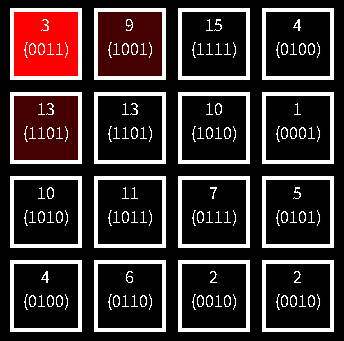
上下左右の移動を繰り返して左上のマスから右下のマスまで移動したときの通過地点の値のXORが0になるwalkを探すパズルをつくります。walk とは始点から終点への経路であって、同じ頂点や同じ辺を複数回通っても良いもののことです。
D – XOR Shortest Walk を解く
一応、ヒントになったものがあってそれがこの問題です。
求めるものは「walk に含まれる辺の重みのビット単位 XOR の最小値」です。walkは同じ辺や頂点を通るため、単純な最短経路問題のように解くことはできません。しかし辺の重みは 0 以上 2^10 未満なので「頂点倍化」と呼ばれるテクニックを用いて解くことができます。
(1,0), (1,1), …, (1,1023), (2,0), (2,1), …, (N,1023) を頂点とする1024 × N 頂点のグラフを考えます。そして「元のグラフにおいて頂点 x から頂点 y への重み w の有向辺があるときかつそのときに限り、1024 × N 頂点のグラフでは頂点 (x, s) から頂点 (y, s XOR w) への有向辺がある」と考えます。
あとは頂点 (1,0) から (N,0), (N,1), …, (N,1023) の各頂点へ到達可能であるかどうかを判定し、到達可能な (N,x)のうち x が最小になるものが答えということになります。
|
1 2 3 4 5 6 7 8 9 10 11 12 13 14 15 16 17 18 19 20 21 22 23 24 25 26 27 28 29 30 31 32 33 34 35 36 37 38 39 40 41 42 43 44 45 46 47 48 49 50 51 52 53 54 55 56 57 58 59 60 61 62 |
class Program { static void Main() { (int, int) ReadInt2() { string[] vs = Console.ReadLine().Split(); return (int.Parse(vs[0]), int.Parse(vs[1])); } (int, int, int) ReadInt3() { string[] vs = Console.ReadLine().Split(); return (int.Parse(vs[0]), int.Parse(vs[1]), int.Parse(vs[2])); } (int N, int M) = ReadInt2(); List<(int, int)>[] E = new List<(int, int)>[N]; for (int i = 0; i < N; i++) E[i] = new List<(int, int)>(); for (int i = 0; i < M; i++) { (int u, int v, int w) = ReadInt3(); u--; v--; E[u].Add((v, w)); } bool[,] seen = new bool[N, 1024]; Queue<(int, int)> q = new Queue<(int, int)>(); q.Enqueue((0, 0)); seen[0, 0] = true; while (q.Count > 0) { var tp = q.Dequeue(); foreach (var e in E[tp.Item1]) { int next = e.Item1; int nv = tp.Item2 ^ e.Item2; if (!seen[next, nv]) { seen[next, nv] = true; q.Enqueue((next, nv)); } } } for (int i = 0; i < 1024; i++) { if (seen[N - 1, i]) { Console.WriteLine(i); return; } } Console.WriteLine(-1); } } |
HTML部分
HTML部分を示します。上記の問題では0~1023でしたが、これでは無理ゲーすぎるので0~15にして頂点の数も16個にします。また10進数で表示するのではなく2進数表示にする初心者モードも作りました。途中で操作を間違えたときのリセット機能と出題された問題が難しすぎるときにスキップするためのギブアップ機能も追加します。
|
1 2 3 4 5 6 7 8 9 10 11 12 13 14 15 16 17 18 19 20 21 22 23 24 25 26 27 28 29 30 31 32 33 34 35 36 37 38 39 40 41 42 43 44 45 46 47 48 49 50 51 52 53 54 55 56 57 58 59 60 61 62 63 64 65 66 67 68 69 70 71 |
<!DOCTYPE html> <html lang="ja"> <head> <meta charset="UTF-8"> <title>XORがわからないと意味不明!鳩でもわかるXORパズル</title> <meta name = "viewport" content = "width=device-width, initial-scale = 1.0"> <link rel="stylesheet" href="./style.css"> </head> <body> <div id = "container"> <div id = "field"> <div id = "field-header"> <div id = "how-to-play"> <div id = "how-to-play-inner"> 理系とプログラマー以外には優しくないゲームです。 上下左右の移動を繰り返して左上のマスから右下のマスまで移動したときの通過地点の値のXORを0にしてください。 同じマス(スタート地点とゴールも含む)を複数回通る場合もあります。 </div> </div> <div id = "score">Score 0000</div><div id = "time">残り 0</div> <div id = "xor">-</div> </div> <div class = "row"> <div id = "cell-00" class="cell"></div> <div id = "cell-01" class="cell"></div> <div id = "cell-02" class="cell"></div> <div id = "cell-03" class="cell"></div> </div> <div class = "row"> <div id = "cell-10" class="cell"></div> <div id = "cell-11" class="cell"></div> <div id = "cell-12" class="cell"></div> <div id = "cell-13" class="cell"></div> </div> <div class = "row"> <div id = "cell-20" class="cell"></div> <div id = "cell-21" class="cell"></div> <div id = "cell-22" class="cell"></div> <div id = "cell-23" class="cell"></div> </div> <div class = "row"> <div id = "cell-30" class="cell"></div> <div id = "cell-31" class="cell"></div> <div id = "cell-32" class="cell"></div> <div id = "cell-33" class="cell"></div> </div> <div id = "ctrl-buttons"> <button id = "reset">最初から</button> <button id = "giveup">ギブアップ</button> </div> <div id = "volume"></div> <div id = "start-buttons"> <p><label for="player-name">プレイヤー名:</label> <input id = "player-name" maxlength="32"></p> <p><button id = 'start'>START</button></p> <p><button id = 'start-easy'>START(Easyモード)</button></p> <p><button id = 'go-ranking' onclick="location.href = './ranking.html'">ランキング</button></p> </div> </div> </div> <script src = "./app.js"></script> </body> </html> |
style.css
|
1 2 3 4 5 6 7 8 9 10 11 12 13 14 15 16 17 18 19 20 21 22 23 24 25 26 27 28 29 30 31 32 33 34 35 36 37 38 39 40 41 42 43 44 45 46 47 48 49 50 51 52 53 54 55 56 57 58 59 60 61 62 63 64 65 66 67 68 69 70 71 72 73 74 75 76 77 78 79 80 81 82 83 84 85 86 87 88 89 90 91 |
body { background-color: black; color: white; } #container { width: 360px; margin-left: auto; margin-right: auto; margin-top: 10px; border: 0px solid #1DA1F2; } #field { width: 360px; height: 600px; margin-left: auto; margin-right: auto; position: relative; border: 0px #1DA1F2 solid; } #field-header { margin-bottom: 16px; font-size: large; display: block; } #how-to-play { overflow: hidden; margin-bottom: 10px; } #how-to-play-inner { overflow: hidden; font-size: medium; width: 2000px; margin-left: 0px; } #score { float: left; margin-left: 20px; } #time { float: right; margin-right: 20px; } #xor { clear: both; text-align: right; margin-right: 20px; } .row { text-align: center; margin-bottom: 4px; } .cell { width: 64px; height: 64px; margin: 4px; border: 4px solid white; display: inline-block; vertical-align: middle; text-align: center; } #start-buttons { position: absolute; left: 0px; top: 120px; width: 100%; text-align: center; } #start, #start-easy, #go-ranking { font-weight: bold; text-align: center; font-size: 18px; width: 280px; border: none; font-size: 16px; background-color: #1DA1F2; padding: 10px 32px; border-radius: 100vh; color: white; cursor: pointer; } #ctrl-buttons { margin-top: 8px; margin-bottom: 16px; margin-left: 20px; display: block; } #reset, #giveup { width: 120px; height: 40px; margin-right: 20px; } |
グローバル変数
app.js
|
1 2 3 4 5 6 7 8 9 10 11 12 13 14 15 16 17 18 19 20 21 22 23 24 25 26 27 28 29 30 31 32 33 34 35 36 37 38 |
const ROW_COUNT = 4; // 4 × 4 const COL_COUNT = 4; const VALUE_MAX = 16; // マスに表示される値は 0~15 let playing = false; let score = 0; let clear_count = 0; let is_easy_mode = false; // easyモードかnormalモードか? let cur_question = null; // 現在の問題 let cur_index = 0; // 現在どのマスにいるか? let xor = 0; let ignore_click = true; // クリックされても移動処理をおこないたくない場合は true let timer_moving = false; // 経過時間計測中 const REMAINING_TIME_MAX = 180 * 1000; // 残り時間の初期値 let remaining_time = REMAINING_TIME_MAX; // 現在の残り時間 let how_to_play_inner_left = 200; // 画面上に表示される「遊び方」の表示 // DOM要素 const $player_name = document.getElementById('player-name'); const $score = document.getElementById('score'); const $xor = document.getElementById('xor'); const $time = document.getElementById('time'); const $how_to_play = document.getElementById('how-to-play'); const $how_to_play_inner = document.getElementById('how-to-play-inner'); const $start_buttons = document.getElementById('start-buttons'); const $ctrl_buttons = document.getElementById('ctrl-buttons'); // 効果音 const select_sound = new Audio('./sounds/select.mp3'); const ng_sound = new Audio('./sounds/ng.mp3'); const clear_sound = new Audio('./sounds/clear.mp3'); const gameover_sound = new Audio('./sounds/gameover.mp3'); const sounds = [select_sound, ng_sound, clear_sound, gameover_sound]; |
QueueStackクラスの定義
幅優先探索をするときに使うqueueとしてQueueStackクラスを定義します。これは 最短以外は不正解!8パズルでゲームをつくる(1) と同じものです。
|
1 2 3 4 5 6 7 8 9 10 11 12 13 14 15 16 17 18 19 20 |
class QueueStack { constructor(){ this.stackPush = []; this.stackPop = []; } Enqueue(value) { this.stackPush.push(value); } Count = () => this.stackPop.length + this.stackPush.length; Dequeue() { if (this.stackPop.length === 0) { while (this.stackPush.length > 0) this.stackPop.push(this.stackPush.pop()); } return this.stackPop.pop(); } } |
ページが読み込まれたときの処理
ページが読み込まれたときにおこなわれる処理を示します。イベントリスナを追加して最初の問題を表示し、更新処理を開始します。
|
1 2 3 4 5 6 7 8 9 10 11 12 13 14 15 |
window.addEventListener('load', () => { // ローカルストレージに保存されているプレイヤー名があるならこれを表示する const savedName = localStorage.getItem('hatodemowakaru-player-name'); if(savedName && $player_name != null) $player_name.value = savedName; // プレイヤー名が変更されたらローカルストレージにこれを保存する $player_name.addEventListener('change', () => localStorage.setItem('hatodemowakaru-player-name', $player_name.value )); addEventListeners(); showQuestion(); // 問題の生成(後述) startUpdate(); // 更新の開始(後述) initVolume('volume', sounds); // 定番のボリューム調整のための処理(後述) }); |
イベントリスナの追加
イベントリスナを追加する処理を示します。呼び出されている関数については後述します。
|
1 2 3 4 5 6 7 8 9 10 11 12 13 14 15 16 17 18 |
function addEventListeners(){ for (let i = 0; i < ROW_COUNT * COL_COUNT; i++){ const $cell = getElementFromCellIndex(i); $cell.addEventListener('click', () => move(i)); } document.addEventListener('keydown', (ev) => onKeyDown(ev)); document.getElementById('start').addEventListener('click', () => gameStart(false)); document.getElementById('start-easy').addEventListener('click', () => gameStart(true)); document.getElementById('reset').addEventListener('click', () => reset()); document.getElementById('giveup').addEventListener('click', () => giveup()); // 右クリックしてもコンテキストメニューを表示させないがテキストボックスは別 $player_name.oncontextmenu = (ev) => { ev.stopPropagation(); return true; } } |
問題の生成と表示
問題を生成して表示する処理を示します。乱数で0~15の整数を生成してこれで問題をつくります。このとき各頂点に遷移するときにどの頂点から遷移するのかも保存しておきます。
問題が生成されたら本当に解が存在するかどうかを調べます。これは頂点倍化された頂点(0, values[0])から(ROW_COUNT * COL_COUNT – 1 ,0)までたどり着くことができるかで判定できます。解が存在する場合は問題と解をセットにして戻り値として返します。解が存在しない場合はnullを返します。
|
1 2 3 4 5 6 7 8 9 10 11 12 13 14 15 16 17 18 19 20 21 22 23 24 25 26 27 28 29 30 31 32 33 34 35 36 37 38 39 40 41 42 43 44 45 46 47 48 49 50 51 52 53 |
function createQuestion(){ const values = []; for (let i = 0; i < ROW_COUNT * COL_COUNT; i++) values.push(Math.floor(Math.random() * VALUE_MAX)); const edges = []; for (let i = 0; i < ROW_COUNT * COL_COUNT; i++) edges.push([]); for (let i = 0; i < ROW_COUNT * COL_COUNT; i++){ const nexts = getNextIndexes(i); nexts.forEach(next => edges[i].push({next:next, v:values[next]})); } const q = new QueueStack(); const seen = []; const paths = []; for (let i = 0; i < ROW_COUNT * COL_COUNT; i++) { seen[i] = []; paths[i] = []; for (let k = 0; k < VALUE_MAX; k++) { seen[i].push(false); paths[i].push(null); } } q.Enqueue({idx:0, v:values[0]}); seen[0][values[0]] = true; paths[0][values[0]] = [0]; while (q.Count() > 0){ const cur = q.Dequeue(); const nexts = getNextIndexes(cur.idx); // curから移動できるマスのindexを求める(後述) nexts.forEach(next => { const nv = cur.v ^ values[next]; if (!seen[next][nv]) { seen[next][nv] = true; paths[next][nv] = [...paths[cur.idx][cur.v]] paths[next][nv].push(next); q.Enqueue({idx:next, v:nv}); } }); } let ans = null; if (seen[ROW_COUNT * COL_COUNT - 1][0]) ans = paths[ROW_COUNT * COL_COUNT - 1][0]; if(ans != null) return {values:values, ans:ans}; else return null; } |
getNextIndexes関数は引数で渡された値に対応するマスから移動できるマスに対応する頂点のindexを取得するためのものです。
|
1 2 3 4 5 6 7 8 9 10 11 12 13 14 15 |
function getNextIndexes(idx){ const r = Math.floor(idx / COL_COUNT); const c = idx % COL_COUNT; const nexts = []; if (r > 0) nexts.push(idx - COL_COUNT); if (r < ROW_COUNT - 1) nexts.push(idx + COL_COUNT); if (c > 0) nexts.push(idx - 1); if (c < COL_COUNT - 1) nexts.push(idx + 1); return nexts; } |
問題が生成されたらこれを表示します。生成された問題に解が存在しない場合はcreateQuestion関数がnullを返すのでnullではない値が返されるまでcreateQuestion関数の実行を繰り返します。
問題は0~15の整数の配列ですが、easyモードでプレイするときは二進数表示とします。
|
1 2 3 4 5 6 7 8 9 10 11 12 13 14 15 16 17 18 |
function showQuestion(){ cur_index = 0; // 新しい問題を生成したので現在位置は 0(左上のマス)となる do { cur_question = createQuestion(); } while(cur_question == null); // 問題をマスに表示するがeasyモードのときは二進数表記 for (let i = 0; i < ROW_COUNT * COL_COUNT; i++){ const v = cur_question.values[i]; if(!is_easy_mode) getElementFromCellIndex(i).innerHTML = v; // getElementFromCellIndex関数(後述) else getElementFromCellIndex(i).innerHTML = `${v}<br>(${ToBinary(v)})`; } changeCellsColor(cur_index); // 現在位置とそこから移動可能なマスの色を変える(後述) xor = cur_question.values[0]; // スタート地点の値がxorの値 showXOR(xor); // xorの値を表示する(後述) } |
getElementFromCellIndex関数は引数として渡された頂点のindexに対応するマスのDOM要素を返します。
|
1 2 3 4 5 |
function getElementFromCellIndex(idx){ const r = Math.floor(idx / COL_COUNT); const c = Math.floor(idx % COL_COUNT); return document.getElementById(`cell-${r}${c}`); } |
引数で渡された値を二進数の文字列に変換する処理を示します。
|
1 2 3 4 5 |
function ToBinary(n){ const s = n.toString(2); const arr = ['0000', '000', '00', '0', ''] return arr[s.length] + s; } |
現在位置とそこから移動可能なマスの色を変える処理を示します。やっていることは、現在位置とその上下左右のマスに色をつけているだけです。
|
1 2 3 4 5 6 7 8 9 10 11 12 13 |
function changeCellsColor(cur_idx){ for(let i = 0; i < ROW_COUNT * COL_COUNT; i++) getElementFromCellIndex(i).style.backgroundColor = '#000'; const nexts = getNextIndexes(cur_idx); const cur_elm = getElementFromCellIndex(cur_idx); cur_elm.style.backgroundColor = '#f00'; nexts.forEach(next => { const elm = getElementFromCellIndex(next); elm.style.backgroundColor = '#400'; }) } |
現在のxorの値を表示する処理を示します。
|
1 2 3 4 |
function showXOR(xor){ const text = !is_easy_mode ? `XOR = ${xor}` : `XOR = ${xor}(${ToBinary(xor)})`; $xor.innerHTML = text; } |
更新処理の開始
更新処理を開始します。更新処理ではtimer_movingがtrueのときは前回更新時と現在時刻の差だけ残り時間を減算してこれを表示するとともに、残り時間が0になったときはゲームオーバーの処理をおこなっています。またHowToPlayの文字列を左方向に流す処理もおこなっています。
|
1 2 3 4 5 6 7 8 9 10 11 12 13 14 15 16 17 18 19 20 21 22 23 24 25 26 27 28 29 30 31 32 33 34 35 36 37 38 39 40 41 |
function startUpdate(){ let prev_time = 0; function update(){ requestAnimationFrame(() => update()); const cur_time = Date.now(); if(timer_moving) remaining_time -= cur_time - prev_time; prev_time = cur_time; if(remaining_time < 0) remaining_time = 0; $score.innerHTML = `Score ${score.toLocaleString()}`; const sec = Math.floor(remaining_time / 1000); const time_text = ` ${sec.toString().padStart(3, '0')}.${(remaining_time % 1000).toString().padStart(3, '0')}`; $time.innerHTML = time_text; // 文字列を左方向に流す how_to_play_inner_left--; if(how_to_play_inner_left < -1800) how_to_play_inner_left = 400; $how_to_play_inner.style.marginLeft = `${how_to_play_inner_left}px`; if(remaining_time == 0 && playing){ // タイムアップ playing = false; ignore_click = true; saveScore($player_name.value, score); // スコアランキングに登録(後述) gameover_sound.currentTime = 0; gameover_sound.play(); setTimeout(() => { $start_buttons.style.display = 'block'; }, 2000); } } update(); } |
ボリューム調整の処理
すでに定番化して久しい処理です。
|
1 2 3 4 5 6 7 8 9 10 11 12 13 14 15 16 17 18 19 20 21 22 23 24 25 26 27 28 29 30 31 32 33 34 35 36 37 38 39 40 41 42 43 44 45 46 47 48 49 50 51 52 53 54 55 56 |
function initVolume(elementId, sounds){ let volume = 0.3; const savedVolume = localStorage.getItem('hatodemowakaru-volume'); if(savedVolume) volume = Number(savedVolume); const $element = document.getElementById(elementId); const $div = document.createElement('div'); const $span1 = document.createElement('span'); $span1.innerHTML = '音量'; $div.appendChild($span1); const $range = document.createElement('input'); $range.type = 'range'; $div.appendChild($range); const $span2 = document.createElement('span'); $div.appendChild($span2); $range.addEventListener('input', () => { const value = $range.value; $span2.innerText = value; volume = Number(value) / 100; setVolume(); }); $range.addEventListener('change', () => localStorage.setItem('hatodemowakaru-volume', volume.toString())); setVolume(); $span2.innerText = Math.round(volume * 100).toString(); $span2.style.marginLeft = '16px'; $range.value = Math.round(volume * 100).toString(); $range.style.width = '230px'; $range.style.verticalAlign = 'middle'; $element.appendChild($div); const $button = document.createElement('button'); $button.innerHTML = '音量テスト'; $button.style.width = '120px'; $button.style.height = '45px'; $button.style.marginTop = '12px'; $button.style.marginLeft = '32px'; $button.addEventListener('click', () => { sounds[0].currentTime = 0; sounds[0].play(); }); $element.appendChild($button); function setVolume(){ for(let i = 0; i < sounds.length; i++) sounds[i].volume = volume; } } |
ゲーム開始以降におこなわれる処理は次回にします。
