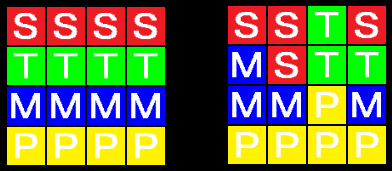
今回はパズルゲーム STAMP をつくります。こんな感じのゲームです。
左が初期状態、右がお題です。
2×2の領域を上書きして以下のように変更していきます。
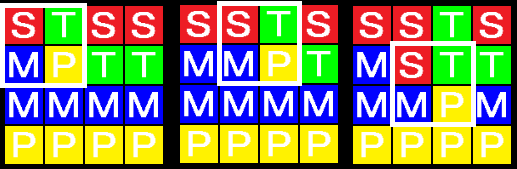
最短手数で完成させることができない場合は不正解です。最初は2手問題からスタートして120秒の制限時間内にどれだけ解くことができるかを競うゲームです。
Contents
HTML部分
HTML部分を示します。
|
1 2 3 4 5 6 7 8 9 10 11 12 13 14 15 16 17 18 19 20 21 22 23 24 25 26 27 28 29 30 31 32 33 34 35 36 37 38 39 40 41 42 43 44 45 46 47 48 |
<!DOCTYPE html> <html lang="ja"> <head> <meta charset="UTF-8"> <title>鳩でもわかる STAMP PAZZLE</title> <meta name = "viewport" content = "width=device-width, initial-scale = 1.0"> <link rel="stylesheet" href="./style.css"> </head> <body> <div id = "container"> <div id = "field"> <div id = "how-to-play"> <span id = "how-to-play-inner"> 鳩でもわかる STAMP PAZZLE の遊び方。 枠を移動させて上下のマスに描かれている文字列を同じにしてください。 操作方法。PCは↑↓←→キーで移動、Spaceキーで置換。 スマホは枠の内部をタップすれば置換、枠の外側をタップすると枠がその方向に移動します。 </span> </div> <div id = "field-header"> <div id = "question"></div> <div id = "time"></div> <div id = "score"></div> </div> <div id = "canvas-outer"></div> <div id = "ctrl-buttons"> <button id = "reset">最初から</button> </div> <div id = "volume"></div> <div id = "start-buttons"> <p><label for="player-name">プレイヤー名:</label> <input id = "player-name" maxlength="32"></p> <p><button id = 'start'>START</button></p> <p><button id = 'go-ranking' onclick="location.href = './ranking.html'">ランキング</button></p> </div> </div> </div> <script src = "./app.js"></script> </body> </html> |
style.css
|
1 2 3 4 5 6 7 8 9 10 11 12 13 14 15 16 17 18 19 20 21 22 23 24 25 26 27 28 29 30 31 32 33 34 35 36 37 38 39 40 41 42 43 44 45 46 47 48 49 50 51 52 53 54 55 56 57 58 59 60 61 62 63 64 65 66 67 68 69 70 71 72 73 74 75 76 77 78 79 80 81 82 83 84 85 86 87 88 89 90 91 92 93 94 95 96 97 98 99 100 101 102 103 104 105 106 107 |
body { background-color: black; color: white; } #container { width: 360px; margin-left: auto; margin-right: auto; margin-top: 10px; border: 0px solid #1DA1F2; } #field { width: 360px; height: 560px; margin-left: auto; margin-right: auto; position: relative; border: 0px wheat solid; } #field-header { margin-bottom: 8px; font-size: large; } #how-to-play { overflow: hidden; } #how-to-play-inner { margin-left: 400px; width: 1200px; white-space: nowrap; } #question { float: left; font-size: medium; } #time { text-align: right; font-size: medium; } #score { clear: both; } #canvas-outer { width: 360px; border: 0px red solid; } #start-buttons { position: absolute; left: 0px; top: 140px; width: 100%; text-align: center; } #start, #go-ranking { font-weight: bold; text-align: center; font-size: 18px; width: 280px; border: none; font-size: 16px; background-color: #1DA1F2; padding: 10px 32px; border-radius: 100vh; color: white; cursor: pointer; } #ctrl-buttons { margin-top: 8px; margin-bottom: 16px; text-align: center; vertical-align: middle; display: none; } #reset { width: 120px; height: 40px; margin-left: 10px; margin-right: 10px; vertical-align: middle; } .red { color: magenta; font-weight: bold; } .aqua { color: aqua; font-weight: bold; } .ml { margin-left: 20px; } |
グローバル変数
グローバル変数ですが、大幅に減らすことにしました。これだけです。
|
1 2 3 4 5 6 7 8 9 10 11 12 13 14 15 |
const CELL_SIZE = 40; const ROW_COUNT = 4; const COL_COUNT = 4; const MAX_REMAINING_TIME = 120 * 1000; const CANVAS_WIDTH = 360; const CANVAS_HEIGHT = 360; const $canvas = document.createElement('canvas'); document.getElementById('canvas-outer')?.appendChild($canvas); $canvas.width = CANVAS_WIDTH; $canvas.height = CANVAS_HEIGHT; const ctx = $canvas.getContext('2d'); |
Cellクラスの定義
Cellクラスを定義します。
マスは4×4でこのグループを上下にひとつずつ作ります。上側が現在の状態、下側がお題です。引数から描画すべき座標が決まるのでこれを求めてメンバ変数に格納しておきます。
|
1 2 3 4 5 6 7 8 9 10 11 12 13 14 15 16 17 18 19 20 21 22 23 24 25 26 27 28 29 |
class Cell { constructor(group, row, col){ this.Group = group; // 0: 現在の状態、1: お題 this.Row = row; this.Col = col; this.X = col * CELL_SIZE + 96; this.Y = row * CELL_SIZE + 8 + (this.Group == 0 ? 0 : CELL_SIZE * (ROW_COUNT + 0.5)); this.ImageIndex = 0; // 0: 'S', 1: 'T', 2: 'M', 3: 'P' に対応するイメージ const image_files = ['s', 't', 'm', 'p']; this.Images = []; this.Images.length = 4; for(let i = 0; i < 4; i++){ this.Images[i] = new Image(); this.Images[i].src = `./images/${image_files[i]}.png`; } } Draw(){ const x = this.X + 1; // 隣のマスとの間に隙間をいれたい const y = this.Y + 1; const size = CELL_SIZE - 2; ctx.drawImage(this.Images[this.ImageIndex], x, y, size, size); ctx.lineWidth = 2; ctx.strokeStyle = '#fff'; ctx.lineWidth = 1; } } |
QueueStackクラスの定義
幅優先探索をするときに使うqueueとしてQueueStackクラスを定義します。これは 最短以外は不正解!8パズルでゲームをつくる(1) と同じものです。
|
1 2 3 4 5 6 7 8 9 10 11 12 13 14 15 16 17 18 19 20 |
class QueueStack { constructor(){ this.stackPush = []; this.stackPop = []; } Enqueue(value) { this.stackPush.push(value); } Count = () => this.stackPop.length + this.stackPush.length; Dequeue() { if (this.stackPop.length === 0) { while (this.stackPush.length > 0) this.stackPop.push(this.stackPush.pop()); } return this.stackPop.pop(); } } |
Questionクラスの定義
Questionクラスを定義します。
|
1 2 3 4 5 6 7 8 9 |
class Question { constructor(text, limit){ this.Text = text; // マスに書かれてる文字('0':'S', '1':'T', '2':'M', '3':'P') this.Limit = limit; // 最短手数 this.Stage = 0; this.IsCleared = false; this.AdditionalText = ''; // 加点時に表示する文字列 } } |
Gemeクラスの定義
Gameクラスを定義します。
コンストラクタ
コンストラクタを示します。
|
1 2 3 4 5 6 7 8 9 10 11 12 13 14 15 16 17 18 19 20 21 22 23 24 25 26 27 28 29 30 31 32 33 34 35 36 37 38 39 40 |
class Game { constructor(){ this.$question = document.getElementById('question'); this.$score = document.getElementById('score'); this.$time = document.getElementById('time'); this.$start_buttons = document.getElementById('start-buttons'); this.$ctrl_buttons = document.getElementById('ctrl-buttons'); this.$how_to_play_inner = document.getElementById('how-to-play-inner'); this.HowToPlayInnerLeft = 400; this.SelectSound = new Audio('./sounds/select.mp3'); this.NgSound = new Audio('./sounds/ng.mp3'); this.MissSound = new Audio('./sounds/miss.mp3'); this.StageClearSound = new Audio('./sounds/clear.mp3'); this.GameOverSound = new Audio('./sounds/gameover.mp3'); this.Sounds = [this.SelectSound, this.NgSound, this.MissSound, this.StageClearSound, this.GameOverSound]; this.IsPlaying = false; this.Score = 0; this.CurRow = 0; // スタンプが押される4つのマスの左上のマスがある行 this.CurCol = 0; // 列 this.MoveCount = 0; // そのお題でスタンプを押した回数 this.IgnoreMove = true; // trueのときは、スタンプに関する操作をおこなわない this.RemainingTime = MAX_REMAINING_TIME; // 残り時間 this.Cells = this.CreateCells(); // Cellオブジェクトの配列 this.Questions = []; // お題が格納された配列 // マスに描画される文字を初期状態にする for (let i = 0; i < ROW_COUNT * COL_COUNT; i++){ this.Cells[0][i].ImageIndex = Math.floor(i / COL_COUNT); this.Cells[1][i].ImageIndex = Math.floor(i / COL_COUNT); } this.PrevUpdateTime = Date.now(); // 前回 更新処理が行われた時刻(経過時間の計算に使う) this.Update(); // 更新開始 } } |
Cellオブジェクトの生成
マスを描画するためのCellオブジェクトを生成する処理を示します。
|
1 2 3 4 5 6 7 8 9 10 11 12 13 14 15 |
class Game { CreateCells(){ const cells = []; for(let group = 0; group < 2; group++){ cells.push([]); cells[group].length = ROW_COUNT * COL_COUNT; for (let i = 0; i < ROW_COUNT * COL_COUNT; i++){ const row = Math.floor(i / COL_COUNT); const col = i % COL_COUNT; cells[group][i] = new Cell(group, row, col); } } return cells; } } |
お題の生成
お題を生成する処理を示します。初期状態では各行に同じ種類の文字が並んでいるので、これを’0000111122223333’で表します。この状態から遷移できるすべての状態とそこまでの手数を幅優先探索ですべて取得します。そのあと各手数から1つずつ選んでこれを問題とします。
実際に幅優先探索をしてみると、最長手数は9手であることがわかります。問題が9個では少なすぎるので、このあと最長問題をシャッフルして取得された問題の後ろに追加します。初期状態と1手問題を捨てると全部で147問分取得することができます。制限時間120秒ではすべて解くことは物理的に不可能です。
|
1 2 3 4 5 6 7 8 9 10 11 12 13 14 15 16 17 18 19 20 21 22 23 24 25 26 27 28 29 30 31 32 33 34 35 36 37 38 39 40 41 42 43 44 45 46 47 48 49 50 51 52 53 54 55 56 57 58 59 60 61 62 63 64 65 66 67 68 69 70 71 72 73 74 75 76 77 78 79 80 81 82 83 84 85 86 |
class Game { CreateQuestions(){ const init_s = '0000111122223333'; const map = new Map(); const q = new QueueStack(); q.Enqueue(init_s); map.set(init_s, 0); while (q.Count() > 0){ const cur = q.Dequeue(); const nexts = getNexts(cur); // 遷移先の文字列をすべて取得する nexts.forEach(next => { if (!map.has(next)) { // 未探索であれば Queue に格納してループを続ける map.set(next, map.get(cur) + 1); q.Enqueue(next); } }); } // 最長手数を求める(明らかに9手なのだが念のため) let max = 0; for(let val of map.values()) max = Math.max(max, val); // 最短手数ごとにわける const qs = []; qs.length = max + 1; for(let i = 0; i <= max; i++) qs[i] = []; for(let key of map.keys()){ const val = map.get(key); qs[val].push(key); } // 0手から9手問題まで1つずつランダムに選ぶ const questions = []; for(let i = 0; i <= max; i++){ const idx = Math.floor(Math.random() * qs[i].length); questions.push(new Question(qs[i][idx], i)) qs[i].splice(idx, 1); } // 9手問題の残りの部分をランダムにシャッフルしてお題に追加する while(qs[max].length > 0){ const idx = Math.floor(Math.random() * qs[max].length); questions.push(new Question(qs[max][idx], max)); qs[max].splice(idx, 1); } // お題に連番をつける for(let i = 0; i < questions.length; i++) questions[i].Stage = i; // 初期状態と1手問題(簡単すぎる)は捨てる questions.shift(); questions.shift(); return questions; // 二次元配列であれば [r,c]を左上とする2×2の領域を'0123'に置き換えた文字列を取得する function getNext(s, r, c){ const idx1 = r * COL_COUNT + c; const idx2 = r * COL_COUNT + c + 1; const idx3 = (r + 1) * COL_COUNT + c; const idx4 = (r + 1) * COL_COUNT + c + 1; const chars = s.split(''); chars[idx1] = '0'; chars[idx2] = '1'; chars[idx3] = '2'; chars[idx4] = '3'; return chars.join(''); } // 引数の状態から遷移可能な状態をすべて取得する function getNexts(s){ const nexts = []; for (let r = 0; r < ROW_COUNT - 1; r++) { for (let c = 0; c < COL_COUNT - 1; c++) nexts.push(getNext(s, r, c)); } return nexts; } } } |
更新処理
更新処理を示します。
|
1 2 3 4 5 6 7 8 9 10 11 12 13 14 15 16 17 18 19 20 21 22 23 24 25 26 27 28 29 30 31 32 33 34 35 36 37 38 39 40 41 42 43 44 45 46 47 48 49 50 51 52 53 54 55 56 57 58 59 60 61 62 63 64 65 66 67 68 69 70 71 |
class Game { // 上側に表示されているマスのなかで row, col の位置にあるCellオブジェクトを取得する GetCellPosition(row, col){ const cell = this.Cells[0][row * COL_COUNT + col]; return {x: cell.X, y: cell.Y}; } Update(){ requestAnimationFrame(() => this.Update()); // マスの描画 ctx.fillStyle = '#000'; ctx.fillRect(0, 0, CANVAS_WIDTH, CANVAS_HEIGHT); for (let group = 0; group < 2; group++) this.Cells[group].forEach(cell => cell.Draw()); // 現在選択されているセルを左上とする2×2のマスを囲む枠を描画する const position = this.GetCellPosition(this.CurRow, this.CurCol); ctx.strokeStyle = '#fff'; ctx.lineWidth = 8; ctx.strokeRect(position.x, position.y, CELL_SIZE * 2, CELL_SIZE * 2); ctx.lineWidth = 1; // 現在時刻と前回の更新時刻との差を求め、これを残り時間から減算する const cur_time = Date.now(); const diff_time = cur_time - this.PrevUpdateTime; this.PrevUpdateTime = cur_time; // 差分を残り時間から本当に減算するのは // プレイ中であり現在のお題をクリアしていないときだけである const cur_question = this.Questions.length > 0 ? this.Questions[0] : null; if(this.IsPlaying && !cur_question.IsCleared){ this.RemainingTime -= diff_time; if(this.RemainingTime < 0) this.RemainingTime = 0; if(this.RemainingTime == 0) this.Gameover(); // 時間切れになったらゲームオーバー(後述) } // 現在解いている問題に関する情報(残り◯手とかクリアor失敗など)を表示する if(cur_question != null){ const limit = cur_question.Limit; if(cur_question.IsCleared) this.$question.innerHTML = `${limit} 手問題 <span class = "aqua ml">クリア</span>`; else if(this.MoveCount == limit) this.$question.innerHTML = `${limit} 手問題 <span class = "red ml">失敗</span>`; else this.$question.innerHTML = `${limit} 手問題 <span class = "ml">(残り ${limit - this.MoveCount} 手)</span>`; } // 残り時間の表示 const ms = this.RemainingTime % 1000; const sec = Math.floor(this.RemainingTime / 1000); const timeText = `残り ${sec.toString().padStart(2, '0')}.${ms.toString().padStart(3, '0')} 秒`; this.$time.innerHTML = timeText; // スコアの表示 // クリア時は加点された点数を表示する(計算方法は後述) if(!this.IsPlaying || !cur_question.IsCleared) this.$score.innerHTML = `Score <span class = "ml">${this.Score.toLocaleString()}</span>`; else this.$score.innerHTML = `<span class = "red">${cur_question.AdditionalText}</span>` // 遊び方、説明文の表示 this.HowToPlayInnerLeft--; if(this.HowToPlayInnerLeft < -1980) this.HowToPlayInnerLeft = 400; this.$how_to_play_inner.style.marginLeft = `${this.HowToPlayInnerLeft}px`; } } |
ゲーム開始の処理
ゲーム開始の処理を示します。
|
1 2 3 4 5 6 7 8 9 10 11 12 13 14 15 16 17 18 |
class Game { GameStart(){ this.RemainingTime = MAX_REMAINING_TIME; this.Questions = this.CreateQuestions(); // お題を生成する this.InitQuestion(); // お題の初期状態を表示する this.$start_buttons.style.display = 'none'; this.$ctrl_buttons.style.display = 'block'; this.IsPlaying = true; this.IgnoreMove = false; this.Score = 0; this.SelectSound.currentTime = 0; this.SelectSound.play(); } } |
お題の初期状態を表示する
現在解いている問題を初期状態に戻す処理を示します。
Questionsの先頭の要素からTextを取り出してこれをCells[1][x].ImageIndexにセットするとともに、Cells[0][x].ImageIndexも初期状態に戻しています。
|
1 2 3 4 5 6 7 8 9 10 11 12 |
class Game { InitQuestion(){ this.MoveCount = 0; // 初期状態に戻すので着手は 0 手に戻す const chars = this.Questions[0].Text.split(''); for (let i = 0; i < ROW_COUNT * COL_COUNT; i++) this.Cells[0][i].ImageIndex = Math.floor(i / COL_COUNT); for (let i = 0; i < ROW_COUNT * COL_COUNT; i++) this.Cells[1][i].ImageIndex = Number(chars[i]); } } |
選択範囲の移動
選択範囲を移動させる処理を示します。
|
1 2 3 4 5 6 7 8 9 10 11 12 13 14 15 16 17 18 19 20 21 22 23 24 25 26 27 28 29 30 31 32 33 34 35 36 37 38 39 40 41 |
class Game { Move(dir){ if(this.IgnoreMove){ this.NgSound.currentTime = 0; this.NgSound.play(); return false; } this.IgnoreMove = true; // 移動可能なら選択範囲を移動させる let done = false; if(dir == 'U' && this.CurRow > 0){ this.CurRow--; done = true; } if(dir == 'D' && this.CurRow < ROW_COUNT - 2){ this.CurRow++; done = true; } if(dir == 'L' && this.CurCol > 0){ this.CurCol--; done = true; } if(dir == 'R' && this.CurCol < COL_COUNT - 2){ this.CurCol++; done = true; } // 効果音で移動の成否を知らせる if(done){ this.SelectSound.currentTime = 0; this.SelectSound.play(); } else { this.NgSound.currentTime = 0; this.NgSound.play(); } this.IgnoreMove = false; } } |
canvasをクリックしたとき、その座標が選択範囲として描画されている矩形の上下左右であった場合はその方向に移動できるようにします。また矩形の内部がクリックされたときはスタンプを押す処理(後述)をおこないます。
以下は引数で渡された座標から選択範囲をどの方向に移動させるかを取得する関数です。
|
1 2 3 4 5 6 7 8 9 10 11 12 13 14 15 16 17 18 19 20 21 |
class Game { GetMoveDirect(x, y){ const left = this.CurCol * CELL_SIZE + 96; const right = left + CELL_SIZE * 2; const top = this.CurRow * CELL_SIZE + 8; const bottom = top + CELL_SIZE * 2; if(left < x && x < right && top < y && y < bottom) return 'STAMP'; else if(left < x && x < right && y < top) return 'U'; else if(left < x && x < right && y > bottom) return 'D'; else if(x < left && top < y && y < bottom) return 'L'; else if(x > right && top < y && y < bottom) return 'R'; else return 'NONE'; } } |
canvasがクリックされたらcanvas上の座標を引数にしてOnClickedCanvas関数が呼び出されます。
|
1 2 3 4 5 6 7 8 9 10 11 12 13 14 15 16 17 18 19 20 |
class Game { OnClickedCanvas(x, y){ const ret = this.GetMoveDirect(x, y); if(ret == 'U') this.Move('U'); else if(ret == 'D') this.Move('D'); else if(ret == 'L') this.Move('L'); else if(ret == 'R') this.Move('R'); else if(ret == 'STAMP') this.Stamp(); else { this.NgSound.currentTime = 0; this.NgSound.play(); } } } |
スタンプを押す処理
スタンプを押す処理を示します。
選択されている2×2の矩形で囲まれている部分に描画されるイメージを変更します。そのあとお題と比較して同じであればステージクリアです。その場合は加算される点数をスコアに加算するのですが、ここで問題発生!
加算される点数を残り時間だけから求めるとステージクリア数が増えてもあまり加点されないのでステージに応じて求めた別の値を掛け合わることにしたのですが、自分でテストプレイしたときは 2のx乗を掛けてもあまり感動できる点数にならなかったので4のx乗を掛けることにしました。すると・・・
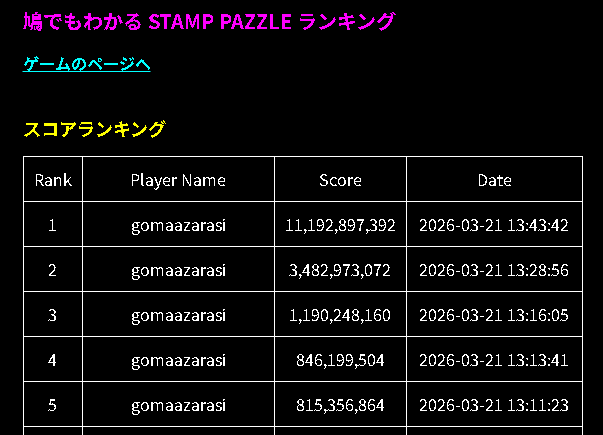
こうなってしまいました((TT))。100億点超えってw。
指数関数なんか使わずに(残り時間 + クリアしたステージ数 × α)くらいにしておけばよかったと後悔しています(後悔先に立たず)。
|
1 2 3 4 5 6 7 8 9 10 11 12 13 14 15 16 17 18 19 20 21 22 23 24 25 26 27 28 29 30 31 32 33 34 35 36 37 38 39 40 41 42 43 44 45 46 47 48 49 50 51 52 53 54 55 |
class Game { Sleep = async(ms) => await new Promise(_ => setTimeout(_, ms)); async Stamp(){ if(this.IgnoreMove){ this.NgSound.currentTime = 0; this.NgSound.play(); return false; } this.IgnoreMove = true; // 選択範囲に描画するイメージを変更 this.Cells[0][this.CurRow * COL_COUNT + this.CurCol].ImageIndex = 0; this.Cells[0][this.CurRow * COL_COUNT + this.CurCol + 1].ImageIndex = 1; this.Cells[0][(this.CurRow + 1) * COL_COUNT + this.CurCol].ImageIndex = 2; this.Cells[0][(this.CurRow + 1) * COL_COUNT + this.CurCol + 1].ImageIndex = 3; this.MoveCount++; this.SelectSound.currentTime = 0; this.SelectSound.play(); const limit = this.Questions[0].Limit; if(this.Check()){ // ステージクリア? // 加算される点数を計算 const v = Math.floor(this.RemainingTime / 100); const stage = this.Questions[0].Stage; const add = v * Math.pow(4, stage); this.Score += add; this.Questions[0].IsCleared = true; // 加算される点数がどのように計算されたのかがわかるように計算式を表示する this.Questions[0].AdditionalText = `${v.toLocaleString()} × 4 ^ ${stage} = ${add.toLocaleString()}`; this.StageClearSound.currentTime = 0; this.StageClearSound.play(); await this.Sleep(2000); this.Questions.shift(); // 次の問題に切り替える this.InitQuestion(); } else { if(limit <= this.MoveCount){ // 着手数が制限手数に達してもクリアできない場合は「失敗」 this.MissSound.currentTime = 0; this.MissSound.play(); await this.Sleep(2000); this.InitQuestion(); // そのお題をもう一度最初からやり直す } } this.IgnoreMove = false; } } |
クリア判定
クリア判定の処理を示します。上下の対応するマスに描画されているイメージが同じかどうかを確認しているだけです。
|
1 2 3 4 5 6 7 8 9 |
class Game { Check(){ for (let i = 0; i < ROW_COUNT * COL_COUNT; i++) { if(this.Cells[0][i].ImageIndex != this.Cells[1][i].ImageIndex) return false; } return true; } } |
リセット
途中で操作を間違えたときはお題の初期状態に戻します。
|
1 2 3 4 5 6 7 8 9 10 |
class Game { Reset(){ if(!this.IsPlaying || this.IgnoreMove){ this.NgSound.currentTime = 0; this.NgSound.play(); return; } this.InitQuestion(); } } |
ゲームオーバー処理
残り時間が 0 になったらゲームオーバーの処理をおこないます。スコアをスコアランキングに登録してプレイ中は非表示になっていたスタートボタンを再表示させます。
|
1 2 3 4 5 6 7 8 9 10 11 12 13 14 15 16 17 18 19 20 21 22 23 24 25 26 27 28 29 30 31 32 33 34 35 36 37 38 |
class Game { Gameover(){ if(this.IsPlaying){ this.IsPlaying = false; this.IgnoreMove = true; this.SaveScore(); this.GameOverSound.currentTime = 0; this.GameOverSound.play(); this.$ctrl_buttons.style.display = 'none'; setTimeout(() => { this.$start_buttons.style.display = 'block'; }, 3000); } } SaveScore(){ const $player_name = document.getElementById('player-name'); let player_name = $player_name.value; if(player_name == '') player_name = '名無しのゴンベ'; // JSON形式でPOST fetch('./ranking-new.php', { method: 'POST', headers: { 'Content-Type': 'application/json' }, body: JSON.stringify({ name: player_name, score: this.Score, }) }); } } |
サーバー側の処理とスコアランキングを表示させる処理はゲーム開始以降の処理 鳩でもわかるXORパズルをつくる(2)と同じなので省略します。
ページが読み込まれたときの処理
ページが読み込まれたらGameオブジェクトを生成して、イベントリスナを追加します。
|
1 2 3 4 5 6 7 8 9 10 11 12 13 14 15 16 17 18 19 20 21 22 23 24 25 26 27 28 29 30 31 32 33 34 35 36 37 38 39 40 41 42 |
window.addEventListener('load', () => { const savedName = localStorage.getItem('hatodemowakaru-player-name'); const $player_name = document.getElementById('player-name'); if(savedName && $player_name != null) $player_name.value = savedName; $player_name.addEventListener('change', () => localStorage.setItem('hatodemowakaru-player-name', $player_name.value )); const game = new Game(); document.getElementById('start').addEventListener('click', () => game.GameStart()); document.getElementById('reset').addEventListener('click', () => game.Reset()); $canvas.addEventListener('click', ev => { const rect = $canvas.getBoundingClientRect(); const x = ev.clientX - rect.x; const y = ev.clientY - rect.y; game. OnClickedCanvas(x, y); }); document.addEventListener('keydown', (ev) => { if(game.IsPlaying) ev.preventDefault(); if(ev.code == 'ArrowUp') game.Move('U'); if(ev.code == 'ArrowDown') game.Move('D'); if(ev.code == 'ArrowLeft') game.Move('L'); if(ev.code == 'ArrowRight') game.Move('R'); if(ev.code == 'Space') game.Stamp(); }); $player_name.oncontextmenu = (ev) => { ev.stopPropagation(); return true; } initVolume('volume', game.Sounds); }); |
以下はレンジスライダーでボリューム調整を可能にするための当サイト定番の処理です。
|
1 2 3 4 5 6 7 8 9 10 11 12 13 14 15 16 17 18 19 20 21 22 23 24 25 26 27 28 29 30 31 32 33 34 35 36 37 38 39 40 41 42 43 44 45 46 47 48 49 50 51 52 53 54 55 56 |
function initVolume(elementId, sounds){ let volume = 0.3; const savedVolume = localStorage.getItem('hatodemowakaru-volume'); if(savedVolume) volume = Number(savedVolume); const $element = document.getElementById(elementId); const $div = document.createElement('div'); const $span1 = document.createElement('span'); $span1.innerHTML = '音量'; $div.appendChild($span1); const $range = document.createElement('input'); $range.type = 'range'; $div.appendChild($range); const $span2 = document.createElement('span'); $div.appendChild($span2); $range.addEventListener('input', () => { const value = $range.value; $span2.innerText = value; volume = Number(value) / 100; setVolume(); }); $range.addEventListener('change', () => localStorage.setItem('hatodemowakaru-volume', volume.toString())); setVolume(); $span2.innerText = Math.round(volume * 100).toString(); $span2.style.marginLeft = '16px'; $range.value = Math.round(volume * 100).toString(); $range.style.width = '230px'; $range.style.verticalAlign = 'middle'; $element.appendChild($div); const $button = document.createElement('button'); $button.innerHTML = '音量テスト'; $button.style.width = '120px'; $button.style.height = '45px'; $button.style.marginTop = '12px'; $button.style.marginLeft = '32px'; $button.addEventListener('click', () => { sounds[0].currentTime = 0; sounds[0].play(); }); $element.appendChild($button); function setVolume(){ for(let i = 0; i < sounds.length; i++) sounds[i].volume = volume; } } |
