cannon.jsで駄菓子屋10円ゲームをつくる(2)の続きです。今回は前回定義したクラスを用いてゲームを完成させます。
ページが読み込まれたときの処理
ページが読み込まれたときにおこなう処理を示します。
canvasのサイズを調整してcannon.jsでコース、壁、ボールなどのオブジェクトを生成、イベントリスナの追加、更新処理の開始、ボリュームコントローラーの生成などをおこなっています。
|
1 2 3 4 5 6 7 8 9 10 11 12 13 14 |
window.addEventListener('load', () => { $canvas.width = CANVAS_WIDTH; $canvas.height = CANVAS_HEIGHT; createWorld(); addEventListeners(); setInterval(() => { world.step(1 / 60); draw(); }, 1000/60); initVolume('volume-controller', sounds); }); |
ボリュームコントローラーの生成
いまや定番の処理となったボリュームコントローラーを生成する処理を示します。ここでは詳細は書きません。レンジスライダーでボリューム調整できるようにするを参照してください。
|
1 2 3 4 5 6 7 8 9 10 11 12 13 14 15 16 17 18 19 20 21 22 23 24 25 26 27 28 29 30 31 32 33 34 35 36 37 38 39 40 41 42 43 44 45 46 47 48 49 50 51 52 53 54 55 56 |
function initVolume(elementId, sounds){ let volume = 0.3; const savedVolume = localStorage.getItem('hatodemowakaru-volume'); if(savedVolume) volume = Number(savedVolume); const $element = document.getElementById(elementId); const $div = document.createElement('div'); const $span1 = document.createElement('span'); $span1.innerHTML = '音量'; $div?.appendChild($span1); const $range = document.createElement('input'); $range.type = 'range'; $div?.appendChild($range); const $span2 = document.createElement('span'); $div?.appendChild($span2); $range.addEventListener('input', () => { const value = $range.value; $span2.innerText = value; volume = Number(value) / 100; setVolume(); }); $range.addEventListener('change', () => localStorage.setItem('hatodemowakaru-volume', volume.toString())); setVolume(); $span2.innerText = Math.round(volume * 100).toString(); $span2.style.marginLeft = '16px'; $range.value = Math.round(volume * 100).toString(); $range.style.width = '230px'; $range.style.verticalAlign = 'middle'; $element?.appendChild($div); const $button = document.createElement('button'); $button.innerHTML = '音量テスト'; $button.style.width = '120px'; $button.style.height = '45px'; $button.style.marginTop = '12px'; $button.style.marginLeft = '32px'; $button.addEventListener('click', () => { sounds[0].currentTime = 0; sounds[0].play(); }); $element?.appendChild($button); function setVolume(){ for(let i = 0; i < sounds.length; i++) sounds[i].volume = volume; } } |
オブジェクトの生成
cannon.jsでコース、壁、ボールなどのオブジェクトを生成する処理を示します。
左側のようにworldに生成したオブジェクトを追加します。赤い部分とボールが衝突したらミス、緑の部分と衝突した場合はゲームクリアです。これらのオブジェクトを右側のように描画します。
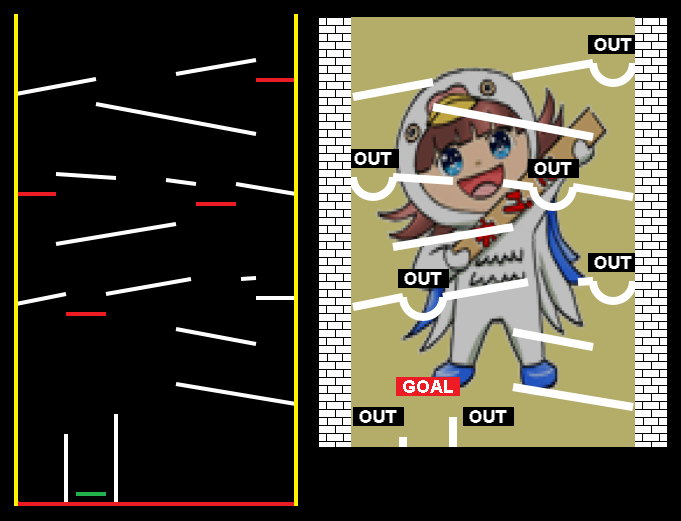
重力加速度は9.8なのですが、これだと動作がゆっくりになります。理由は長さの単位がメートル(重さの単位はキログラム)だからです。これだと高さ数百メートルの巨大なゲーム機ができてしまうので重力加速度に100をかけて調整しています。
|
1 2 3 4 5 6 7 8 9 10 11 12 13 14 15 16 17 18 19 20 21 22 23 24 25 26 27 28 29 30 31 32 33 34 35 36 37 38 39 40 41 |
function createWorld(){ world.gravity.set( 0, -9.8 * 100, 0 ); // 重力加速度(毎秒9.8なら1フレームあたり) // ゴール(緑の部分) goal = new Goal({x:100, y:-20}, {x:130, y:-20}); goal.AddToWorld(world); // 生成するだけでなく忘れずにworldに追加する // コース(白の部分) courses.push(new Course({x: 40, y: 380}, {x: 120, y: 395})); courses.push(new Course({x: 200, y: 400}, {x: 280, y: 414})); courses.push(new Course({x: 120, y: 370}, {x: 280, y: 340})); courses.push(new Course({x: 320, y: 280}, {x: 260, y: 290})); courses.push(new Course({x: 220, y: 290}, {x: 190, y: 294})); courses.push(new Course({x: 140, y: 296}, {x: 80, y: 300})); courses.push(new Course({x: 200, y: 250}, {x: 80, y: 230})); courses.push(new Course({x: 40, y: 170}, {x: 90, y: 180})); courses.push(new Course({x: 130, y: 180}, {x: 215, y: 195})); courses.push(new Course({x: 265, y: 195}, {x: 280, y: 196})); courses.push(new Course({x: 200, y: 145}, {x: 280, y: 130})); courses.push(new Course({x: 320, y: 70}, {x: 200, y: 90})); courses.push(new Course({x: 140, y: 60}, {x: 140, y: -40})); // あたりとの仕切り courses.push(new Course({x: 90, y: 40}, {x: 90, y: -40})); // あたりとの仕切り // 穴(赤の部分) holes.push(new Hole({x: 300, y: 414})); holes.push(new Hole({x: 240, y: 290})); holes.push(new Hole({x: 60, y: 300})); holes.push(new Hole({x: 110, y: 180})); holes.push(new Hole({x: 300, y: 196})); courses.forEach(c => c.AddToWorld(world)); holes.forEach(h => h.AddToWorld(world)); // 壁(黄色と赤の部分) wall = new Wall(); wall.AddToWorld(world); // 10円玉(実態はボール) ball = new Ball(70, TOP_Y); ball.AddToWorld(world); } |
イベントリスナの追加
STARTボタンとSHOTボタンを押下したときに処理をおこなうことができるようにイベントリスナを追加します。
STARTボタンが押下されたときはボールを初期位置に戻してSTARTボタン等を非表示にしてSHOTボタン等を表示させます。SHOTボタンを押下されたときは10円玉を射出して処理がおこなわれたとき(10円玉が壁に接していないときはなにも起きない)は効果音を鳴らします。
|
1 2 3 4 5 6 7 8 9 10 11 12 13 14 15 16 17 18 19 20 21 22 |
function addEventListeners(){ document.getElementById('start')?.addEventListener('click', () => { selectSound.play(); ball.Init(); $control_buttons.style.display = 'block'; $start_buttons.style.display = 'none'; }); document.getElementById('shot')?.addEventListener('mousedown', (ev) => { ev.preventDefault(); if(ball.ShotToLeft(power) || ball.ShotToRight(power)) shotSound.play(); }); document.getElementById('shot')?.addEventListener('touchstart', (ev) => { ev.preventDefault(); if(ball.ShotToLeft(power) || ball.ShotToRight(power)) shotSound.play(); }); // ロングタッチでコンテキストメニューが表示されないようにする document.oncontextmenu = () => { return false; }; } |
更新処理
更新処理を示します。requestAnimationFrame関数をそのまま使ってしまうとディスプレイが60FSPでない場合、処理速度が違ってしまうので1000 / 60秒以内に更新処理がおこなわれようとしたときはスキップするようにしています。
更新処理そのものは world.step(1 / 60) を実行して 1 / 60 秒後の状態にしたあと10円玉を打ち出すときの強さを変更しています。そのあと描画処理をしています。
|
1 2 3 4 5 6 7 8 9 10 11 12 13 14 15 16 |
let next_update_time = new Date().getTime() + 1000 / 60; function update(){ const cur_time = new Date().getTime(); if(cur_time >= next_update_time){ next_update_time += 1000 / 60; world.step(1 / 60); power += 8; power %= POWER_MAX; draw(); } requestAnimationFrame(() => update()); } |
描画処理
描画処理を示します。背景として鳩子ちゃんの画像を描画したあとこれを透過25%の黒い矩形で覆っています。これをすることでゲーム機の背面のような感じをだしています。そのあと各オブジェクトを描画し、10円玉を打ち出すためのパワーゲージを描画する処理をおこなっています。
|
1 2 3 4 5 6 7 8 9 10 11 12 13 14 15 16 17 18 19 20 21 22 23 |
function draw(){ ctx.fillStyle = '#f0e68c'; ctx.fillRect(10, 0, CANVAS_WIDTH - 20, CANVAS_HEIGHT); ctx.drawImage(backImage, 40, 50, CANVAS_WIDTH - 80, CANVAS_HEIGHT - 100); ctx.fillStyle = 'rgba(0, 0, 0, 0.25)'; ctx.fillRect(0, 0, CANVAS_WIDTH, CANVAS_HEIGHT); courses.forEach(f => f.Draw()); holes.forEach(f => f.Draw()); ball.Draw(); wall.Draw(); goal.Draw(); power_ctx.fillStyle = '#000'; power_ctx.fillRect(0, 0, POWER_CANVAS_WIDTH, POWER_CANVAS_HEIGHT); power_ctx.fillStyle = '#f00'; power_ctx.fillRect(0, 0, power / (POWER_MAX / POWER_CANVAS_WIDTH), POWER_CANVAS_HEIGHT); power_ctx.font="20px Arial"; power_ctx.textBaseline = "top"; power_ctx.fillStyle = '#fff'; power_ctx.fillText('POWER', 16, 5); } |
