なんともわかるようなわからないような微妙なタイトルですが、こういうことです。

最初の4文字を反転させると「鳩でもわかるC#」になります。では、以下はどうでしょうか?
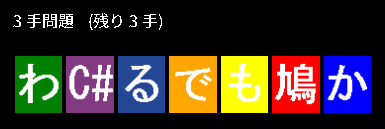
慣れないと意外に難しいかもしれません。
HTML部分
|
1 2 3 4 5 6 7 8 9 10 11 12 13 14 15 16 17 18 19 20 21 22 23 24 25 26 27 28 29 30 31 32 33 34 35 36 37 38 39 40 41 42 43 |
<!DOCTYPE html> <html lang="ja"> <head> <meta charset="UTF-8"> <title>鳩でもわかる Reverse and Reverse</title> <meta name = "viewport" content = "width=device-width, initial-scale = 1.0"> <link rel="stylesheet" href="./style.css"> </head> <body> <div id = "container"> <div id = "field"> <div id = "field-header"> <div id = "how-to-play"> <div id = "how-to-play-inner"> 鳩でもわかる Reverse and Reverse の遊び方:文字列を反転して「鳩でもわかるC#」にしてください。反転したい区間の両端を選ぶだけ。 </div> </div> <div id = "score">Score 000</div><div id = "time">残り 0</div> <div id = "status"></div> </div> <div id = "canvas-outer"></div> <div id = "start-buttons"> <p><label for="player-name">プレイヤー名:</label> <input id = "player-name" maxlength="32"></p> <p><button id = 'start'>START</button></p> <p><button id = 'go-ranking' onclick="location.href = './ranking.html'">ランキング</button></p> </div> <div id = "ctrl-buttons"> <button id = "cancel">ひとつ戻る</button> <button id = "giveup">ギブアップ</button> </div> <div id = "volume"></div> </div> </div> <script src = "./index.js"></script> </body> </html> |
style.css
|
1 2 3 4 5 6 7 8 9 10 11 12 13 14 15 16 17 18 19 20 21 22 23 24 25 26 27 28 29 30 31 32 33 34 35 36 37 38 39 40 41 42 43 44 45 46 47 48 49 50 51 52 53 54 55 56 57 58 59 60 61 62 63 64 65 66 67 68 69 70 71 72 73 74 75 76 77 78 79 80 81 82 83 84 85 86 87 88 89 90 91 92 93 94 95 96 97 98 99 |
body { background-color: black; color: white; } #container { width: 360px; margin-left: auto; margin-right: auto; margin-top: 10px; border: 0px solid #1DA1F2; } #field { width: 360px; height: 600px; margin-left: auto; margin-right: auto; border: 0px #1DA1F2 solid; } #field-header { margin-bottom: 16px; font-size: large; display: block; } #how-to-play { overflow: hidden; margin-bottom: 10px; } #how-to-play-inner { overflow: hidden; font-size: medium; width: 2000px; margin-left: 0px; } #score { float: left; font-size: larger; margin-bottom: 8px; } #time { float: right; } #status { clear: both; font-size: medium; } #start-buttons { width: 100%; text-align: center; } #start, #go-ranking { font-weight: bold; text-align: center; font-size: 18px; width: 280px; border: none; font-size: 16px; background-color: #1DA1F2; padding: 10px 32px; border-radius: 100vh; color: white; cursor: pointer; } #ctrl-buttons { margin-top: 8px; margin-bottom: 16px; margin-left: 20px; text-align: center; display: none; } #cancel, #giveup { width: 120px; height: 40px; margin-right: 20px; } .red { color: red; font-weight: bold; } .aqua { color: aqua; font-weight: bold; } .ml { margin-left: 10px; } |
グローバル定数
グローバル定数は以下のとおりです。
|
1 2 3 4 5 6 7 8 |
const CANVAS_WIDTH = 360; const CANVAS_HEIGHT = 100; const MAX_REMAINING_TIME = 120 * 1000; // 制限時間 const $canvas = document.createElement('canvas'); $canvas.width = CANVAS_WIDTH; $canvas.height = CANVAS_HEIGHT; document.getElementById('canvas-outer')?.appendChild($canvas); |
QueueStackクラスの定義
幅優先探索をするときに使うqueueとしてQueueStackクラスを定義します。これは 最短以外は不正解!8パズルでゲームをつくる(1) と同じものです。
|
1 2 3 4 5 6 7 8 9 10 11 12 13 14 15 16 17 18 19 20 |
class QueueStack { constructor(){ this.stackPush = []; this.stackPop = []; } Enqueue(value) { this.stackPush.push(value); } Count = () => this.stackPop.length + this.stackPush.length; Dequeue() { if (this.stackPop.length === 0) { while (this.stackPush.length > 0) this.stackPop.push(this.stackPush.pop()); } return this.stackPop.pop(); } } |
Cellクラスの定義
マスとそのなかの文字を描画するためのCellクラスを定義します。
this.Text には ‘鳩’, ‘で’, ‘も’, ‘わ’, ‘か’, ‘る’, ‘C’ のうちいずれかの文字が格納され、その文字に対応したイメージが描画されます。
|
1 2 3 4 5 6 7 8 9 10 11 12 13 14 15 16 17 18 19 20 21 22 23 24 25 26 27 28 29 30 31 32 33 34 35 36 37 |
class Cell { constructor(idx) { const w = CANVAS_WIDTH / 7; this.X = idx * w + 2; this.Y = 8; this.Width = w - 4; this.Height = this.Width * 1.2; this.Text = ''; this.Index = idx; this.IsSelected = false; // 反転する区間の一方の端として選択されている状態か否か? // 文字からイメージを取得できるようにする this.Images = new Map(); const keys = ['鳩', 'で', 'も', 'わ', 'か', 'る', 'C'] const arr = ['hato', 'de', 'mo', 'wa', 'ka', 'ru', 'cs']; for(let i = 0; i < 7; i++){ const image = new Image(); image.src = `./images/${arr[i]}.png`; this.Images.set(keys[i], image); } } Draw(){ if(this.IsSelected){ ctx.strokeStyle = '#fff'; ctx.lineWidth = 8; ctx.strokeRect(this.X, this.Y, this.Width, this.Height); ctx.lineWidth = 1; } ctx.drawImage(this.Images.get(this.Text), this.X, this.Y, this.Width, this.Height); } // 引数で渡された座標はマスの内部かどうか? IsInside(x, y) { return this.X < x && x < this.X + this.Width && this.Y < y && y < this.Y + this.Height; } } |
QuestionAnswerクラスの定義
お題と答えをペアにして扱うためのQuestionAnswerクラスを定義します。
|
1 2 3 4 5 6 7 8 9 |
class QuestionAnswer { constructor(q, ans) { this.Question = q; this.Answer = ans; this.Stage = 0; this.IsCleared = false; this.AdditionalText = ''; // クリア時の加点情報 } } |
Gameクラスの定義
Gameクラスを定義します。まずコンストラクタを示します。
|
1 2 3 4 5 6 7 8 9 10 11 12 13 14 15 16 17 18 19 20 21 22 23 24 25 26 27 28 29 30 31 32 33 34 35 36 37 |
class Game { constructor(){ this.$status = document.getElementById('status'); this.$score = document.getElementById('score'); this.$time = document.getElementById('time'); this.$how_to_play_inner = document.getElementById('how-to-play-inner'); this.SelectSound = new Audio('./sounds/select.mp3'); this.NgSound = new Audio('./sounds/ng.mp3'); this.StageClearSound = new Audio('./sounds/clear.mp3'); this.MissSound = new Audio('./sounds/miss.mp3'); this.GameOverSound = new Audio('./sounds/gameover.mp3'); this.Sounds = [this.SelectSound, this.NgSound, this.StageClearSound, this.MissSound, this.GameOverSound]; this.Cells = []; for(let i = 0; i < 7; i++) this.Cells.push(new Cell(i)); this.IsPlaying = false; this.Score = 0; this.RemainingTime = 120 * 1000; this.MoveCount = 0; this.QuestionAnswerPairs = []; this.Selected = -1; // 最初は反転区間の開始点は選択されていない this.History = []; // 操作をひとつ戻すために履歴を取る this.IgnoreClick = false; this.Text = '鳩でもわかるC'; this.$HowToPlayInner = document.getElementById('how-to-play-inner'); this.HowToPlayInnerLeft = 200; this.PrevUpdateTime = Date.now(); // 前回 更新処理が行われた時刻(経過時間の計算に使う) this.Update(); // 更新開始 } } |
以下は効果音再生用の関数です。
|
1 2 3 4 5 6 7 8 9 10 11 12 13 14 15 16 17 18 19 20 21 22 23 24 25 26 |
class Game { PlaySelectSound(){ this.SelectSound.currentTime = 0; this.SelectSound.play(); } PlayNgSound(){ this.NgSound.currentTime = 0; this.NgSound.play(); } PlayStageClearSound(){ this.StageClearSound.currentTime = 0; this.StageClearSound.play(); } PlayMissSound(){ this.MissSound.currentTime = 0; this.MissSound.play(); } PlayGameOverSound(){ this.GameOverSound.currentTime = 0; this.GameOverSound.play(); } } |
連続部分文字列の反転
ReverseString関数は連続した部分文字列を反転させるための関数です。
|
1 2 3 4 5 6 7 8 9 10 11 12 13 14 15 16 17 18 19 20 21 22 |
class Game { ReverseString(s, start, end){ const arr = s.split(''); const after = []; for(let i = s.length - 1; i > end; i--) after.unshift(arr.pop()); const prev = []; for(let i = 0; i < start; i++) prev.push(arr.shift()); arr.reverse(); for(let i = 0; i < arr.length; i++) prev.push(arr[i]); for(let i = 0; i < after.length; i++) prev.push(after[i]); return prev.join(''); } } |
お題の生成
‘C#’だけ2文字で1文字として扱いたいのですが、そうもいかないので代わりに全角文字の’C’を用いています。これをすべての区間で反転させて得られる文字列を新たな遷移先とします。この処理を繰り返すことで文字列の反転処理を繰り返すことで得られるすべての文字列を取得しています。また遷移先にはどのように区間を選択したのかも記憶させ、容易にもとに戻すことができるようにしています。
|
1 2 3 4 5 6 7 8 9 10 11 12 13 14 15 16 17 18 19 20 21 22 23 24 25 26 27 28 29 30 31 32 33 34 35 36 37 38 39 40 41 42 43 44 45 46 47 48 49 50 51 52 53 54 55 56 57 58 59 60 61 62 63 64 65 66 67 68 69 70 71 72 73 |
class Game { CreateQuestion(){ const S = "鳩でもわかるC"; const map = new Map(); map.set(S, []); const q = new QueueStack(); q.Enqueue(S); while (q.Count() > 0){ const cur = q.Dequeue(); for (let start = 0; start < S.length; start++) { for (let end = start + 1; end < S.length; end++) { const t = this.ReverseString(cur, start, end); if (!map.has(t)) { const arr = map.get(cur); // 前の文字列の区間 [start, end] を反転させたらtになるという情報も // 保存しておく const new_arr = []; arr.forEach(_ => new_arr.push(_)); new_arr.push([start, end]); map.set(t, new_arr); q.Enqueue(t); } } } } // 最長手数を調べる(6手だが 2 とおりしかない) let max = 0; for(let val of map.values()){ if(max < val.length) max = val.length; } // 手数ごとに分ける const pairs = []; pairs.length = max + 1; for(let i = 0; i <= max; i++) pairs[i] = []; // 元に戻すためには逆順で反転させていけばよいのでmapの値を反転させればお題の答えが得られる for(let key of map.keys()){ const ans = map.get(key); ans.reverse(); pairs[ans.length].push(new QuestionAnswer(key, ans)); } this.QuestionAnswerPairs = []; // 各手数から1個ずつお題として取得する for (let i = 1; i <= max; i++) { const pair = pairs[i]; const idx = Math.floor(Math.random() * pair.length); this.QuestionAnswerPairs.push(pair[idx]); pair.splice(idx, 1); } // これだけではお題として足りないので最長手数であるものから100個取得する for(let i = max; i >= 1; i--){ const pair = pairs[i]; while(pair.length > 0 && this.QuestionAnswerPairs.length < 100){ const idx = Math.floor(Math.random() * pair.length); // 順番をランダムに this.QuestionAnswerPairs.push(pair[idx]); pair.splice(idx, 1); } } // 通し番号をつける(ステージ数) for(let i = 0; i < this.QuestionAnswerPairs.length; i++) this.QuestionAnswerPairs[i].Stage = i + 1; } } |
更新処理
更新処理を示します。
|
1 2 3 4 5 6 7 8 9 10 11 12 13 14 15 16 17 18 19 20 21 22 23 24 25 26 27 28 29 30 31 32 33 34 35 36 37 38 39 40 41 42 43 44 45 46 47 48 49 50 51 52 53 54 55 |
class Game { Update(){ requestAnimationFrame(() => this.Update()); // 残り時間の減算量を求める const now = Date.now(); const diff = now - this.PrevUpdateTime; this.PrevUpdateTime = now; // プレイ中であり現在のお題をクリアできていないときだけ残り時間を減算する if(this.IsPlaying && !this.QuestionAnswerPairs[0].IsCleared) this.RemainingTime -= diff; if(this.RemainingTime < 0) this.RemainingTime = 0; // プレイ中であり残り時間が 0 になったらゲームオーバー if(this.RemainingTime == 0 && this.IsPlaying) this.GameOver(); // canvasへの描画 ctx.fillStyle = '#000'; ctx.fillRect(0, 0, CANVAS_WIDTH, CANVAS_HEIGHT); for(let i = 0; i < this.Cells.length; i++){ this.Cells[i].Text = this.Text[i]; this.Cells[i].Draw(); } // 残り時間の表示 const sec = Math.floor(this.RemainingTime / 1000); const time_text = `残り ${sec.toString().padStart(3, '0')}.${(this.RemainingTime % 1000).toString().padStart(3, '0')} 秒`; this.$time.innerHTML = time_text; this.$score.innerHTML = `Score ${this.Score.toLocaleString()}`; // 現在の状態を表示(残り手数、成功・失敗など) if(this.QuestionAnswerPairs.length > 0){ const cur_question = this.QuestionAnswerPairs[0]; const limit = cur_question.Answer.length; if(cur_question.IsCleared) this.$status.innerHTML = `${limit} 手問題 <span class = "aqua ml">クリア <span class = "ml">${cur_question.AdditionalText}</span></span>`; else if(limit <= this.MoveCount) this.$status.innerHTML = `${limit} 手問題 <span class = "red ml">失敗</span>`; else this.$status.innerHTML = `${limit} 手問題 <span class = "ml">(残り ${limit - this.MoveCount} 手)</span>`; } // 遊び方の表示 this.HowToPlayInnerLeft--; if(this.HowToPlayInnerLeft < -960) this.HowToPlayInnerLeft = 400; this.$HowToPlayInner.style.marginLeft = `${this.HowToPlayInnerLeft}px`; } } |
ゲーム開始の処理
|
1 2 3 4 5 6 7 8 9 10 11 12 13 14 15 16 17 18 19 20 21 22 23 24 25 26 27 28 29 30 31 32 |
class Game { // スタートボタン等の表示 / 非表示を切り替える ShowStartButtons(show){ document.getElementById('start-buttons').style.display = show ? 'block' : 'none'; document.getElementById('ctrl-buttons').style.display = show ? 'none' : 'block'; } GameStart(){ if(this.Selected != -1) this.Cells[this.Selected].IsSelected = false; if(this.Selected != -1) this.Cells[this.Selected].IsSelected = false; this.Selected = -1; // 反転の区間の端点が未選択の状態にする this.History = []; // 履歴もクリア // お題を生成し、最初のお題をマスにセット this.CreateQuestion(); this.Text = this.QuestionAnswerPairs[0].Question; this.RemainingTime = MAX_REMAINING_TIME; this.MoveCount = 0; this.Score = 0; this.IsPlaying = true; this.IgnoreClick = false; this.ShowStartButtons(false); this.PlaySelectSound(); } } |
反転の処理
マスがクリックされたら以下の処理をおこないます。
反転の区間の端点が未選択の場合:
クリックされたマスを反転の区間の端点とする
反転の区間の端点がすでに設定されている場合:
そのマスと現在クリックされたマスとの間の文字列を反転させる処理をおこなう。
規定の手数に達している場合はクリア、失敗の処理もおこなう。
処理が終わったら区間の端点を未選択状態にする。
|
1 2 3 4 5 6 7 8 9 10 11 12 13 14 15 16 17 18 19 20 21 22 23 24 25 26 27 28 29 30 31 32 33 34 35 36 37 38 39 40 41 42 43 44 45 46 47 48 49 50 51 52 53 54 55 56 57 58 59 60 61 62 63 64 65 66 67 |
class Game { Sleep = async(ms) => await new Promise(_ => setTimeout(_, ms)); // どのマスがクリックされたのかを調べる GetCellFromPosition(x, y){ for(let i = 0; i < this.Cells.length; i++){ if(this.Cells[i].IsInside(x, y)) return this.Cells[i]; } return null; } async OnCanvasClicked(x, y){ if(!this.IsPlaying || this.IgnoreClick){ this.PlayNgSound(); return; } this.IgnoreClick = true; const cell = this.GetCellFromPosition(x, y); if(cell != null){ if(this.Selected == -1){ this.Selected = cell.Index; this.Cells[this.Selected].IsSelected = true; this.PlaySelectSound(); } else { const start = Math.min(this.Selected, cell.Index); const end = Math.max(this.Selected, cell.Index); this.Text = this.ReverseString(this.Text, start, end); this.Cells[this.Selected].IsSelected = false; this.Selected = -1; this.History.push([start, end]); this.MoveCount++; this.PlaySelectSound(); if(this.Text == '鳩でもわかるC'){ const cur_question = this.QuestionAnswerPairs[0]; cur_question.IsCleared = true; const add = this.QuestionAnswerPairs[0].Stage * 1000 + Math.floor(this.RemainingTime / 100); this.Score += add; const add_text = `${add} = 1000 × ${this.QuestionAnswerPairs[0].Stage} + ${Math.floor(this.RemainingTime / 100)}`; cur_question.AdditionalText = add_text; this.PlayStageClearSound(); await this.Sleep(2000); this.QuestionAnswerPairs.shift(); this.Text = this.QuestionAnswerPairs[0].Question; this.MoveCount = 0; this.History = []; } else if(this.MoveCount >= this.QuestionAnswerPairs[0].Answer.length){ this.PlayMissSound(); await this.Sleep(2000); this.Text = this.QuestionAnswerPairs[0].Question; this.MoveCount = 0; this.History = []; } } } if(this.RemainingTime > 0) this.IgnoreClick = false; } } |
ひとつ前の状態に戻す処理
[ひとつ戻る]が押下されたときはマスが選択されているときは非選択の状態に、選択されていないときは直前の反転処理をする前の状態に戻します。
|
1 2 3 4 5 6 7 8 9 10 11 12 13 14 15 16 17 18 19 20 21 22 23 24 |
class Game { Cancel(){ if(!this.IsPlaying || this.IgnoreClick){ this.PlayNgSound(); return; } if(this.Selected != -1){ this.Cells[this.Selected].IsSelected = false; this.Selected = -1; this.PlaySelectSound(); } else { if(this.History.length > 0){ const pair = this.History.pop(); this.Text = this.ReverseString(this.Text, pair[0], pair[1]); this.MoveCount--; this.PlaySelectSound(); } else this.PlayNgSound(); } } } |
ギブアップ時の処理
[ギブアップ]が押下されたら答えを表示し、すべて表示し終わったらゲームスタートボタンを再表示させます。
|
1 2 3 4 5 6 7 8 9 10 11 12 13 14 15 16 17 18 19 20 21 22 23 24 25 26 27 28 29 30 31 32 33 34 35 36 37 38 39 40 41 42 |
class Game { async Giveup(){ if(!this.IsPlaying || this.IgnoreClick){ this.PlayNgSound(); return; } // マスが選択状態になっている場合は解除する if(this.Selected != -1) this.Cells[this.Selected].IsSelected = false; this.Selected = -1; this.IsPlaying = false; // 解を表示中は操作不能にする this.IgnoreClick = true; this.PlaySelectSound(); this.SaveScore(); // スコアをスコアランキングに登録(後述) this.Text = this.QuestionAnswerPairs[0].Question; // お題を初期状態に戻す const ans = this.QuestionAnswerPairs[0].Answer; // 解を取得 for(let i = 0; i < ans.length; i++){ await this.Sleep(1000); // 反転する区間がわかるように区間全体を矩形で囲む for(let idx = ans[i][0]; idx <= ans[i][1]; idx++) this.Cells[idx].IsSelected = true; await this.Sleep(1000); // 区間の反転が終わったら矩形を消去 this.Text = this.ReverseString(this.Text, ans[i][0], ans[i][1]); for(let idx = ans[i][0]; idx <= ans[i][1]; idx++) this.Cells[idx].IsSelected = false; } this.PlayGameOverSound(); await this.Sleep(3000); this.ShowStartButtons(true); } } |
ゲームオーバー処理
ゲームオーバー時の処理を示します。
|
1 2 3 4 5 6 7 8 9 10 11 12 13 14 15 16 |
class Game { GameOver(){ if(!this.IsPlaying) // 二重に処理がおこなわれないようにする return; this.IsPlaying = false; this.IgnoreClick = true; this.SaveScore(); this.PlayGameOverSound(); setTimeout(() => { this.ShowStartButtons(true); }, 2000); } } |
スコアランキングへの登録
スコアをスコアランキングに登録する処理を示します。
|
1 2 3 4 5 6 7 8 9 10 11 12 13 14 15 16 17 18 19 20 |
class Game { SaveScore(){ const $player_name = document.getElementById('player-name'); let player_name = $player_name.value; if(player_name == '') player_name = '名無しのゴンベ'; // JSON形式でPOST fetch('./ranking.php', { method: 'POST', headers: { 'Content-Type': 'application/json' }, body: JSON.stringify({ name: player_name, score: this.Score, }) }); } } |
サーバー側の処理とスコアランキングを表示させる処理はゲーム開始以降の処理 鳩でもわかるXORパズルをつくる(2)と同じなので省略します。
ページが読み込まれたときの処理
ページが読み込まれたらGameオブジェクトを生成して、イベントリスナを追加します。
|
1 2 3 4 5 6 7 8 9 10 11 12 13 14 15 16 17 18 19 20 21 22 23 24 25 26 27 |
window.addEventListener('load', () => { const $player_name = document.getElementById('player-name'); const savedName = localStorage.getItem('hatodemowakaru-player-name'); if(savedName && $player_name != null) $player_name.value = savedName; $player_name.addEventListener('change', () => localStorage.setItem('hatodemowakaru-player-name', $player_name.value )); const game = new Game(); $canvas.addEventListener('click', ev => { const rect = $canvas.getBoundingClientRect(); const x = ev.clientX - rect.x; const y = ev.clientY - rect.y; game.OnCanvasClicked(x, y); }) document.getElementById('start').addEventListener('click', () => game.GameStart()); document.getElementById('cancel').addEventListener('click', () => game.Cancel()); document.getElementById('giveup').addEventListener('click', () => game.Giveup()); $player_name.oncontextmenu = (ev) => { ev.stopPropagation(); return true; } initVolume('volume', game.Sounds); }); |
以下はレンジスライダーでボリューム調整を可能にするための当サイト定番の処理です。
|
1 2 3 4 5 6 7 8 9 10 11 12 13 14 15 16 17 18 19 20 21 22 23 24 25 26 27 28 29 30 31 32 33 34 35 36 37 38 39 40 41 42 43 44 45 46 47 48 49 50 51 52 53 54 55 56 |
function initVolume(elementId, sounds){ let volume = 0.3; const savedVolume = localStorage.getItem('hatodemowakaru-volume'); if(savedVolume) volume = Number(savedVolume); const $element = document.getElementById(elementId); const $div = document.createElement('div'); const $span1 = document.createElement('span'); $span1.innerHTML = '音量'; $div.appendChild($span1); const $range = document.createElement('input'); $range.type = 'range'; $div.appendChild($range); const $span2 = document.createElement('span'); $div.appendChild($span2); $range.addEventListener('input', () => { const value = $range.value; $span2.innerText = value; volume = Number(value) / 100; setVolume(); }); $range.addEventListener('change', () => localStorage.setItem('hatodemowakaru-volume', volume.toString())); setVolume(); $span2.innerText = Math.round(volume * 100).toString(); $span2.style.marginLeft = '16px'; $range.value = Math.round(volume * 100).toString(); $range.style.width = '230px'; $range.style.verticalAlign = 'middle'; $element.appendChild($div); const $button = document.createElement('button'); $button.innerHTML = '音量テスト'; $button.style.width = '120px'; $button.style.height = '45px'; $button.style.marginTop = '12px'; $button.style.marginLeft = '32px'; $button.addEventListener('click', () => { sounds[0].currentTime = 0; sounds[0].play(); }); $element.appendChild($button); function setVolume(){ for(let i = 0; i < sounds.length; i++) sounds[i].volume = volume; } } |
